> ## Documentation Index
> Fetch the complete documentation index at: https://docs.gbase.ai/llms.txt
> Use this file to discover all available pages before exploring further.
# スキル(ワークショップ)
> AI が利用できる専門スキルを管理し、業務に合わせて拡張できます。
export const KnowledgeChatbot = () => {
useEffect(() => {
if (typeof window === "undefined" || typeof document === "undefined") {
return;
}
const CHATBOT_ID = "5c7ce716-1196-4b0c-92a2-12900ff360c8";
const HIDE_STYLE_ID = "gptbase-hide-style";
const WATCHER_FLAG = "__gbaseKnowledgeWatcherInstalled";
const DECOY_FLAG = "__gbaseViewportDecoyInstalled";
const DECOY_ATTR = "data-gbase-viewport-decoy";
const WIDGET_SELECTOR = "#gptbase-bubble-button, #gptbase-message-bubbles, #gptbase-bubble-window";
const onKnowledgeRoute = () => window.location.pathname.startsWith("/knowledge");
const ensureViewportDecoy = () => {
const head = document.head;
const metas = Array.prototype.slice.call(head.querySelectorAll('meta[name="viewport"]'));
if (metas.length === 0) return;
if (!metas[0].hasAttribute(DECOY_ATTR)) {
const decoy = document.createElement("meta");
decoy.setAttribute("name", "viewport");
decoy.setAttribute(DECOY_ATTR, "1");
decoy.setAttribute("content", metas[0].getAttribute("content") || "width=device-width, initial-scale=1");
head.insertBefore(decoy, metas[0]);
}
let keptDecoy = false;
Array.prototype.forEach.call(head.querySelectorAll('meta[name="viewport"]'), meta => {
const isDecoy = meta.hasAttribute(DECOY_ATTR);
const isPluginMeta = (meta.getAttribute("content") || "").includes("user-scalable=no");
if (isDecoy) {
if (keptDecoy) meta.remove(); else keptDecoy = true;
} else if (isPluginMeta) {
meta.remove();
}
});
};
const installViewportDecoyOnce = () => {
if (window[DECOY_FLAG]) return;
window[DECOY_FLAG] = true;
ensureViewportDecoy();
const observer = new MutationObserver(() => ensureViewportDecoy());
observer.observe(document.head, {
childList: true
});
};
const showWidget = () => {
const style = document.getElementById(HIDE_STYLE_ID);
if (style) style.remove();
};
const hideWidget = () => {
if (document.getElementById(HIDE_STYLE_ID)) return;
const style = document.createElement("style");
style.id = HIDE_STYLE_ID;
style.textContent = `${WIDGET_SELECTOR} { display: none !important; }`;
document.head.appendChild(style);
};
const syncVisibility = () => {
if (onKnowledgeRoute()) showWidget(); else hideWidget();
};
const injectPluginOnce = () => {
if (document.getElementById(CHATBOT_ID)) return;
window.gptbaseConfig = {
chatbotId: CHATBOT_ID,
baseUrl: "https://admin.gbase.ai",
apiBaseUrl: "https://admin.gbase.ai/api"
};
const script = document.createElement("script");
script.src = "https://gbase.ai/plugin/plugin.js";
script.id = CHATBOT_ID;
script.defer = true;
document.body.appendChild(script);
};
const installRouteWatcherOnce = () => {
if (window[WATCHER_FLAG]) return;
window[WATCHER_FLAG] = true;
const fire = () => window.requestAnimationFrame(syncVisibility);
["pushState", "replaceState"].forEach(method => {
const original = window.history[method];
window.history[method] = function patched(...args) {
const result = original.apply(this, args);
fire();
return result;
};
});
window.addEventListener("popstate", fire);
window.addEventListener("hashchange", fire);
};
try {
installViewportDecoyOnce();
injectPluginOnce();
installRouteWatcherOnce();
syncVisibility();
} catch (error) {
console.error("[KnowledgeChatbot] setup failed:", error);
}
}, []);
return null;
};
スキルは、エージェントや AI スライドなどの AI 機能に専門能力を追加する仕組みです。Word 文書の作成支援、PDF のデータ抽出、Excel 分析といった標準スキルに加えて、自社の業務に合わせたスキルを追加できます。
### 1. スキル一覧
左サイドバーの「スキル」をクリックすると、専門スキルの一覧が表示されます。
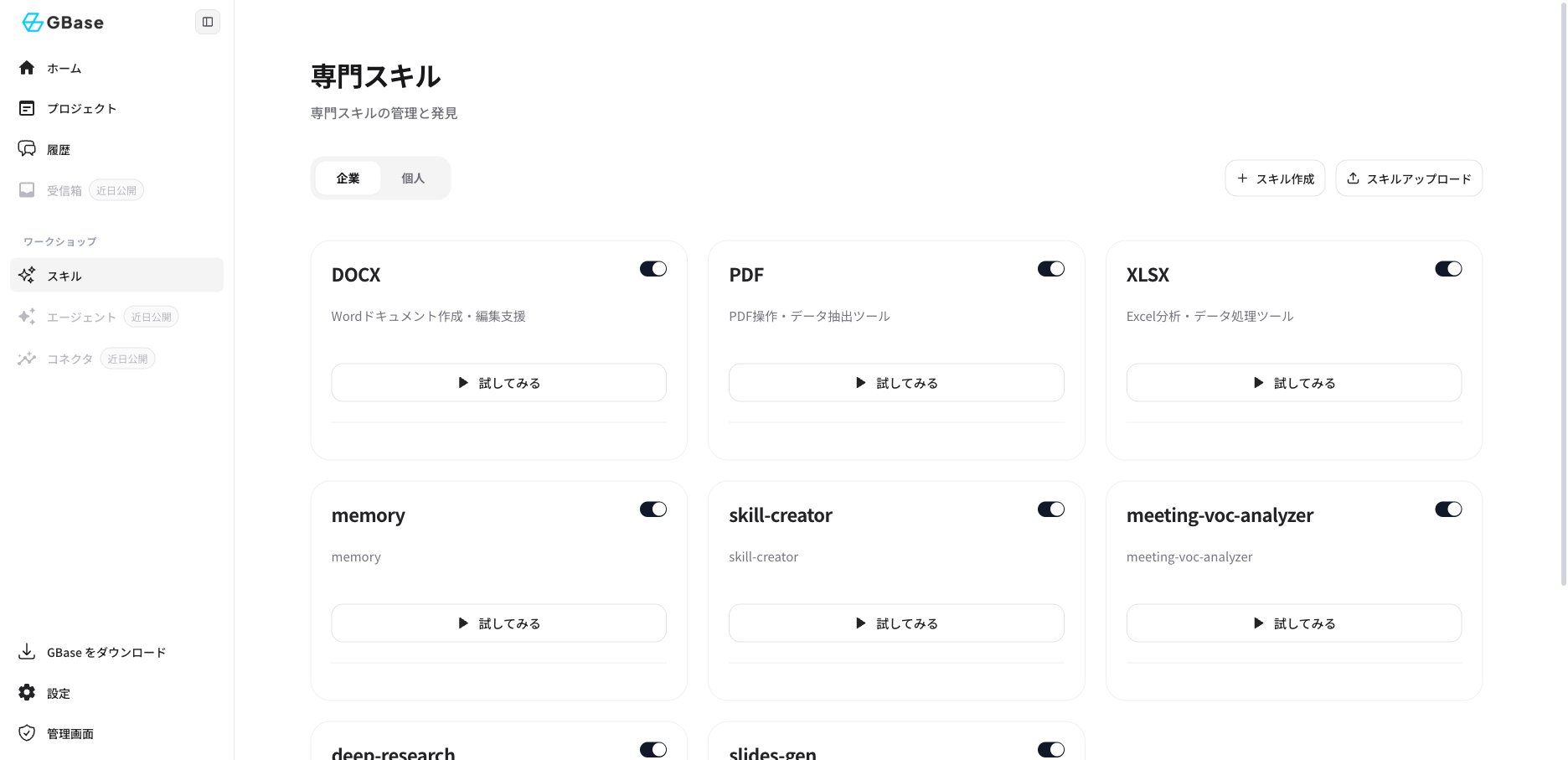 | 画面の場所 | 機能 |
| ------------ | ------------------------------- |
| 「企業」「個人」タブ | 企業全体で共有するスキルと、個人のスキルを切り替えて表示します |
| 各スキルカードのスイッチ | スキルの有効/無効を切り替えます |
| 「試してみる」 | そのスキルを使った対話をすぐに開始できます |
| 「スキル作成」 | 新しいスキルを作成します |
| 「スキルアップロード」 | 作成済みのスキルファイルをアップロードして追加します |
### 2. 標準で利用できるスキルの例
| スキル | 内容 |
| -------------------- | ------------------------------------------- |
| DOCX | Word ドキュメントの作成・編集支援 |
| PDF | PDF 操作・データ抽出 |
| XLSX | Excel 分析・データ処理 |
| deep-research | テーマを深く調査するディープリサーチ |
| slides-gen | スライド生成([AI スライド](/knowledge/ai-slides) の基盤) |
| meeting-voc-analyzer | 会議からの顧客の声(VOC)分析 |
スキルを有効にしておくと、エージェントが質問の内容に応じて自動で適切なスキルを使い分けます。利用者がスキルを意識して操作する必要はありません。
| 画面の場所 | 機能 |
| ------------ | ------------------------------- |
| 「企業」「個人」タブ | 企業全体で共有するスキルと、個人のスキルを切り替えて表示します |
| 各スキルカードのスイッチ | スキルの有効/無効を切り替えます |
| 「試してみる」 | そのスキルを使った対話をすぐに開始できます |
| 「スキル作成」 | 新しいスキルを作成します |
| 「スキルアップロード」 | 作成済みのスキルファイルをアップロードして追加します |
### 2. 標準で利用できるスキルの例
| スキル | 内容 |
| -------------------- | ------------------------------------------- |
| DOCX | Word ドキュメントの作成・編集支援 |
| PDF | PDF 操作・データ抽出 |
| XLSX | Excel 分析・データ処理 |
| deep-research | テーマを深く調査するディープリサーチ |
| slides-gen | スライド生成([AI スライド](/knowledge/ai-slides) の基盤) |
| meeting-voc-analyzer | 会議からの顧客の声(VOC)分析 |
スキルを有効にしておくと、エージェントが質問の内容に応じて自動で適切なスキルを使い分けます。利用者がスキルを意識して操作する必要はありません。