> ## Documentation Index
> Fetch the complete documentation index at: https://docs.gbase.ai/llms.txt
> Use this file to discover all available pages before exploring further.
# 設定
> アカウント情報・表示言語・外部サービス連携・パスワードを管理します。
export const KnowledgeChatbot = () => {
useEffect(() => {
if (typeof window === "undefined" || typeof document === "undefined") {
return;
}
const CHATBOT_ID = "5c7ce716-1196-4b0c-92a2-12900ff360c8";
const HIDE_STYLE_ID = "gptbase-hide-style";
const WATCHER_FLAG = "__gbaseKnowledgeWatcherInstalled";
const DECOY_FLAG = "__gbaseViewportDecoyInstalled";
const DECOY_ATTR = "data-gbase-viewport-decoy";
const WIDGET_SELECTOR = "#gptbase-bubble-button, #gptbase-message-bubbles, #gptbase-bubble-window";
const onKnowledgeRoute = () => window.location.pathname.startsWith("/knowledge");
const ensureViewportDecoy = () => {
const head = document.head;
const metas = Array.prototype.slice.call(head.querySelectorAll('meta[name="viewport"]'));
if (metas.length === 0) return;
if (!metas[0].hasAttribute(DECOY_ATTR)) {
const decoy = document.createElement("meta");
decoy.setAttribute("name", "viewport");
decoy.setAttribute(DECOY_ATTR, "1");
decoy.setAttribute("content", metas[0].getAttribute("content") || "width=device-width, initial-scale=1");
head.insertBefore(decoy, metas[0]);
}
let keptDecoy = false;
Array.prototype.forEach.call(head.querySelectorAll('meta[name="viewport"]'), meta => {
const isDecoy = meta.hasAttribute(DECOY_ATTR);
const isPluginMeta = (meta.getAttribute("content") || "").includes("user-scalable=no");
if (isDecoy) {
if (keptDecoy) meta.remove(); else keptDecoy = true;
} else if (isPluginMeta) {
meta.remove();
}
});
};
const installViewportDecoyOnce = () => {
if (window[DECOY_FLAG]) return;
window[DECOY_FLAG] = true;
ensureViewportDecoy();
const observer = new MutationObserver(() => ensureViewportDecoy());
observer.observe(document.head, {
childList: true
});
};
const showWidget = () => {
const style = document.getElementById(HIDE_STYLE_ID);
if (style) style.remove();
};
const hideWidget = () => {
if (document.getElementById(HIDE_STYLE_ID)) return;
const style = document.createElement("style");
style.id = HIDE_STYLE_ID;
style.textContent = `${WIDGET_SELECTOR} { display: none !important; }`;
document.head.appendChild(style);
};
const syncVisibility = () => {
if (onKnowledgeRoute()) showWidget(); else hideWidget();
};
const injectPluginOnce = () => {
if (document.getElementById(CHATBOT_ID)) return;
window.gptbaseConfig = {
chatbotId: CHATBOT_ID,
baseUrl: "https://admin.gbase.ai",
apiBaseUrl: "https://admin.gbase.ai/api"
};
const script = document.createElement("script");
script.src = "https://gbase.ai/plugin/plugin.js";
script.id = CHATBOT_ID;
script.defer = true;
document.body.appendChild(script);
};
const installRouteWatcherOnce = () => {
if (window[WATCHER_FLAG]) return;
window[WATCHER_FLAG] = true;
const fire = () => window.requestAnimationFrame(syncVisibility);
["pushState", "replaceState"].forEach(method => {
const original = window.history[method];
window.history[method] = function patched(...args) {
const result = original.apply(this, args);
fire();
return result;
};
});
window.addEventListener("popstate", fire);
window.addEventListener("hashchange", fire);
};
try {
installViewportDecoyOnce();
injectPluginOnce();
installRouteWatcherOnce();
syncVisibility();
} catch (error) {
console.error("[KnowledgeChatbot] setup failed:", error);
}
}, []);
return null;
};
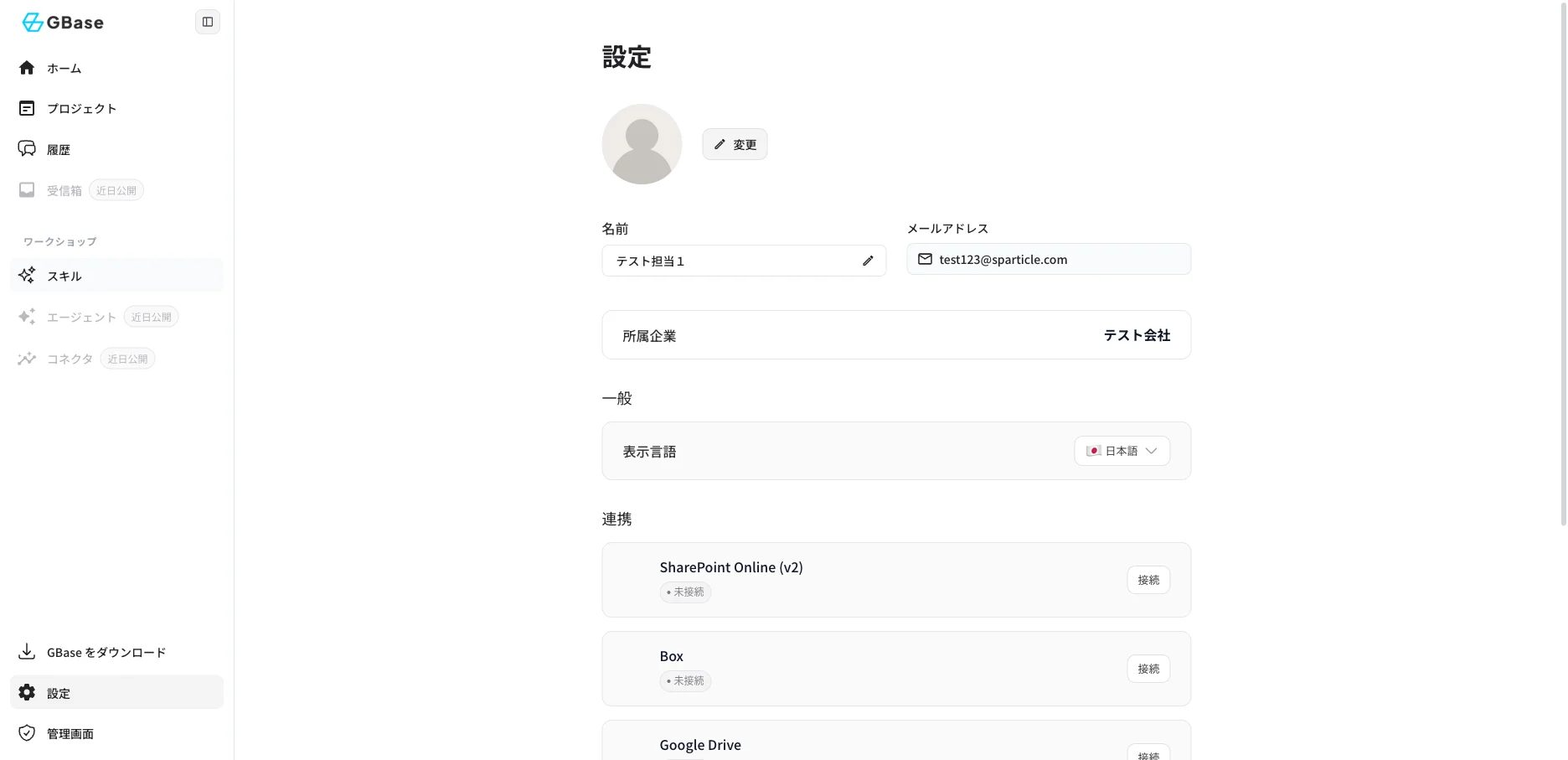
左サイドバーの「設定」をクリックすると、設定画面が表示されます。
 ### 1. アカウント情報
| 項目 | 説明 |
| ------- | -------------------------- |
| アバター | 「変更」をクリックしてプロフィール画像を変更できます |
| 名前 | 鉛筆アイコンをクリックして表示名を変更できます |
| メールアドレス | ログインに使用するメールアドレスです(変更不可) |
| 所属企業 | 所属している組織名が表示されます |
### 2. 表示言語の切り替え
「一般」の「表示言語」から、画面の表示言語をユーザーごとに変更できます。
1. 「表示言語」の選択ボタンをクリックします。
2. 「日本語」「English (US)」「中文 (简体)」「中文 (繁體)」「한국어」から選択します。
### 3. 外部サービス連携
「連携」では、社内で利用中のクラウドストレージと接続できます。接続すると、既存の社内資料をプロジェクトに取り込めるようになります。
| サービス | 操作 |
| ---------------------- | -------------------------------- |
| SharePoint Online (v2) | 「接続」をクリックし、Microsoft アカウントで認証します |
| Box | 「接続」をクリックし、Box アカウントで認証します |
| Google Drive | 「接続」をクリックし、Google アカウントで認証します |
### 4. セキュリティ
「セキュリティ設定」の「パスワード」欄で「リセット」をクリックすると、ログインパスワードを変更できます。
### 5. サインアウト
「システム」の「サインアウト」をクリックすると、ログアウトします。
### 1. アカウント情報
| 項目 | 説明 |
| ------- | -------------------------- |
| アバター | 「変更」をクリックしてプロフィール画像を変更できます |
| 名前 | 鉛筆アイコンをクリックして表示名を変更できます |
| メールアドレス | ログインに使用するメールアドレスです(変更不可) |
| 所属企業 | 所属している組織名が表示されます |
### 2. 表示言語の切り替え
「一般」の「表示言語」から、画面の表示言語をユーザーごとに変更できます。
1. 「表示言語」の選択ボタンをクリックします。
2. 「日本語」「English (US)」「中文 (简体)」「中文 (繁體)」「한국어」から選択します。
### 3. 外部サービス連携
「連携」では、社内で利用中のクラウドストレージと接続できます。接続すると、既存の社内資料をプロジェクトに取り込めるようになります。
| サービス | 操作 |
| ---------------------- | -------------------------------- |
| SharePoint Online (v2) | 「接続」をクリックし、Microsoft アカウントで認証します |
| Box | 「接続」をクリックし、Box アカウントで認証します |
| Google Drive | 「接続」をクリックし、Google アカウントで認証します |
### 4. セキュリティ
「セキュリティ設定」の「パスワード」欄で「リセット」をクリックすると、ログインパスワードを変更できます。
### 5. サインアウト
「システム」の「サインアウト」をクリックすると、ログアウトします。